
Network access control for wired, Wi-Fi and VPN.
Airgate checks every connection to your network against who the user is and the state of their device — Entra ID or Active Directory, Intune, SentinelOne, CrowdStrike — and puts it on the right VLAN or role. When it refuses one, it tells your help desk why, in plain words.
It runs in Airowire's cloud, with a small connector at each site, or on your own VMware hosts.
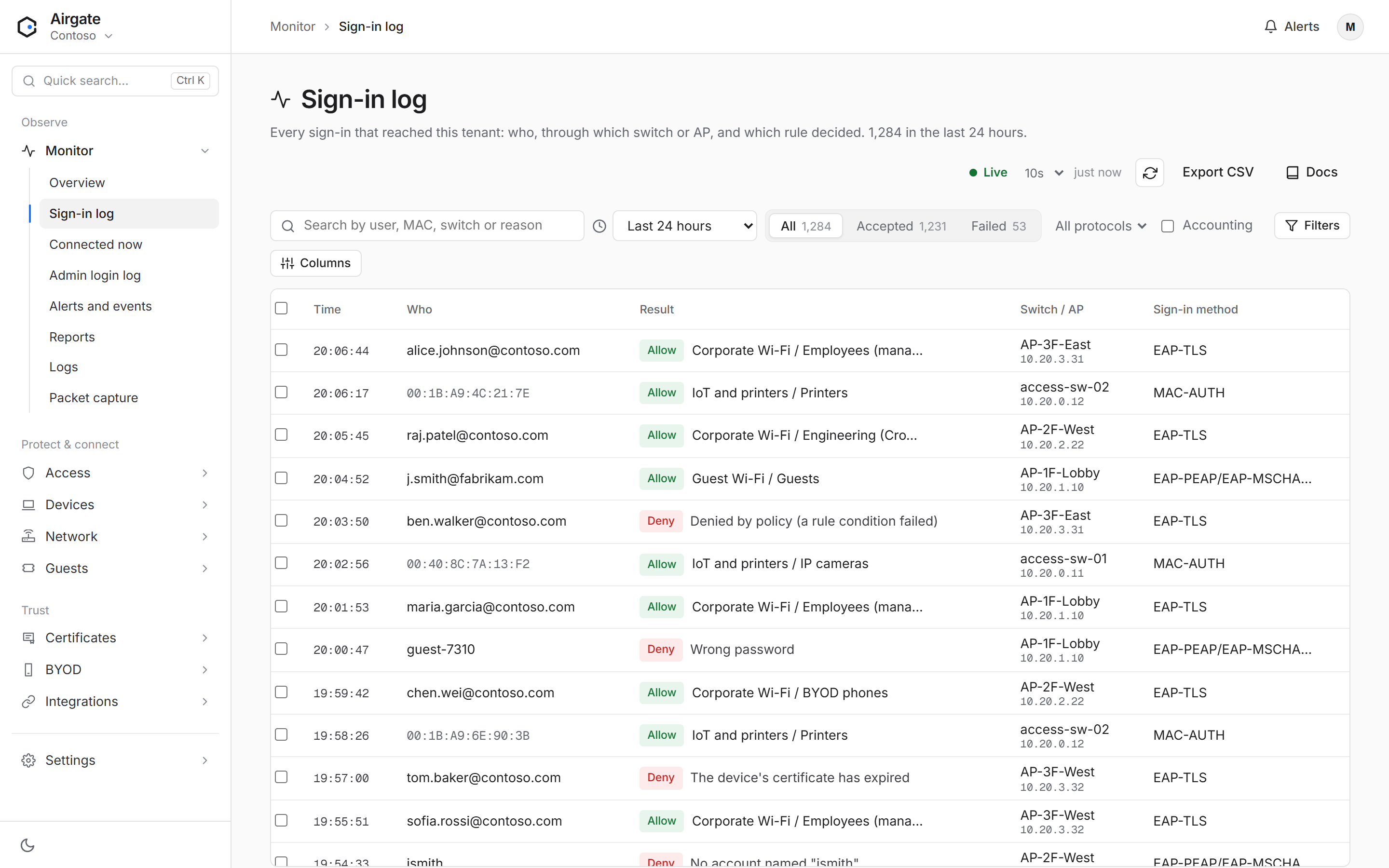
A refused connection comes with its reason.
Most NAC tickets start with "it won't connect". In Airgate the sign-in record says what failed and what to do next, next to the full policy trace for whoever needs it. For example:
Denied: Intune compliance check failed. The sign-in itself worked, but Corporate Wi-Fi requires more: Intune compliance: noncompliant (needs compliant); SentinelOne agent: not found in SentinelOne (needs installed).
Certificate revoked or expired, account disabled, wrong password, the directory not answering in time — each has its own explanation.
How the Sign-in log works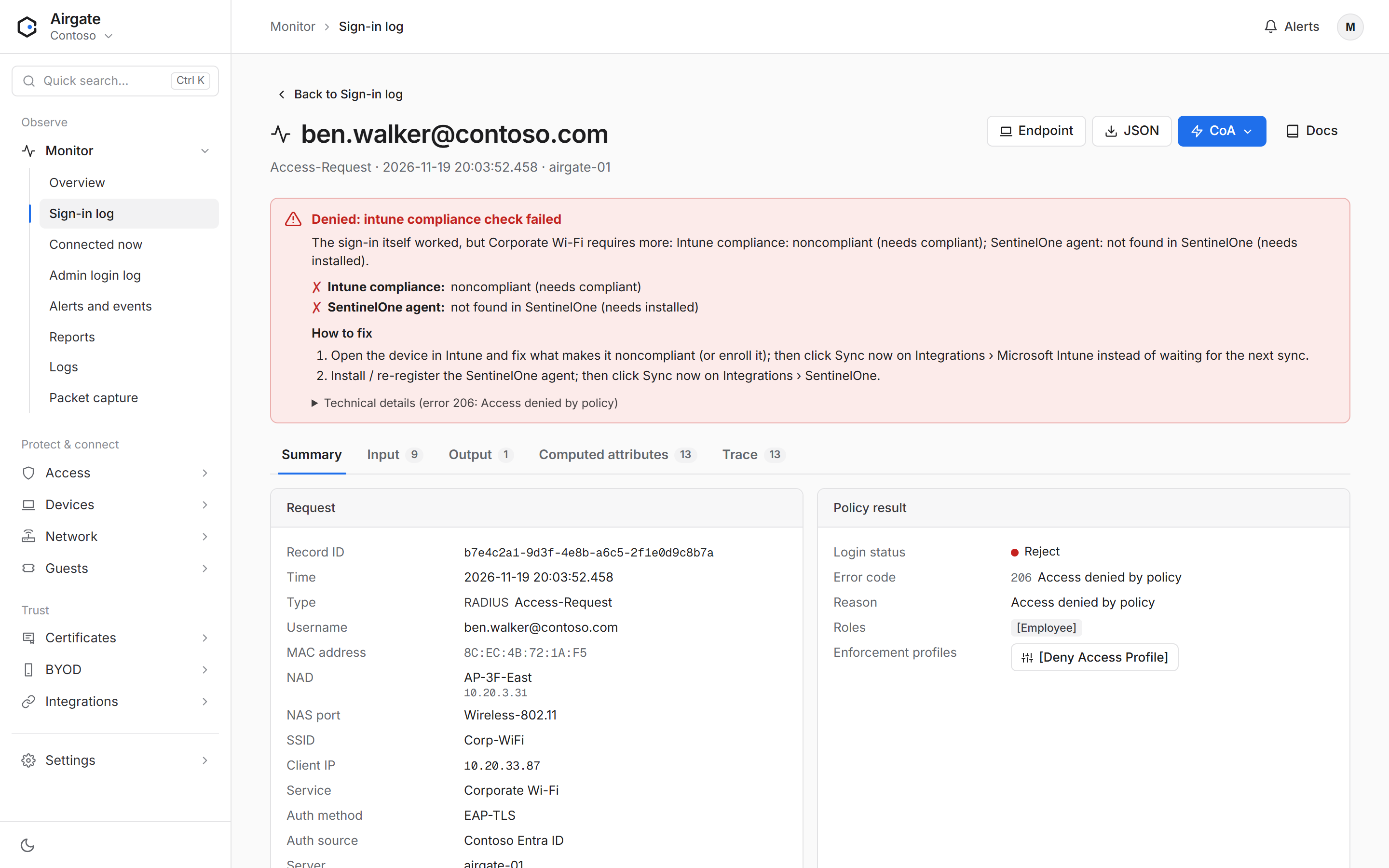
Rules you can read aloud.
An access policy is a short list of rules, checked from the top. "Intune managed is Yes, Intune compliance is Compliant and SentinelOne agent is Installed: give the Employee role." The first rule that matches decides.
Conditions cover the user's groups, the device's compliance in Intune or Jamf, SentinelOne and CrowdStrike state, the network and switch, BYOD enrolment and guest portal sign-in. Test access lets you try a sign-in before a real user does.
Access policies explained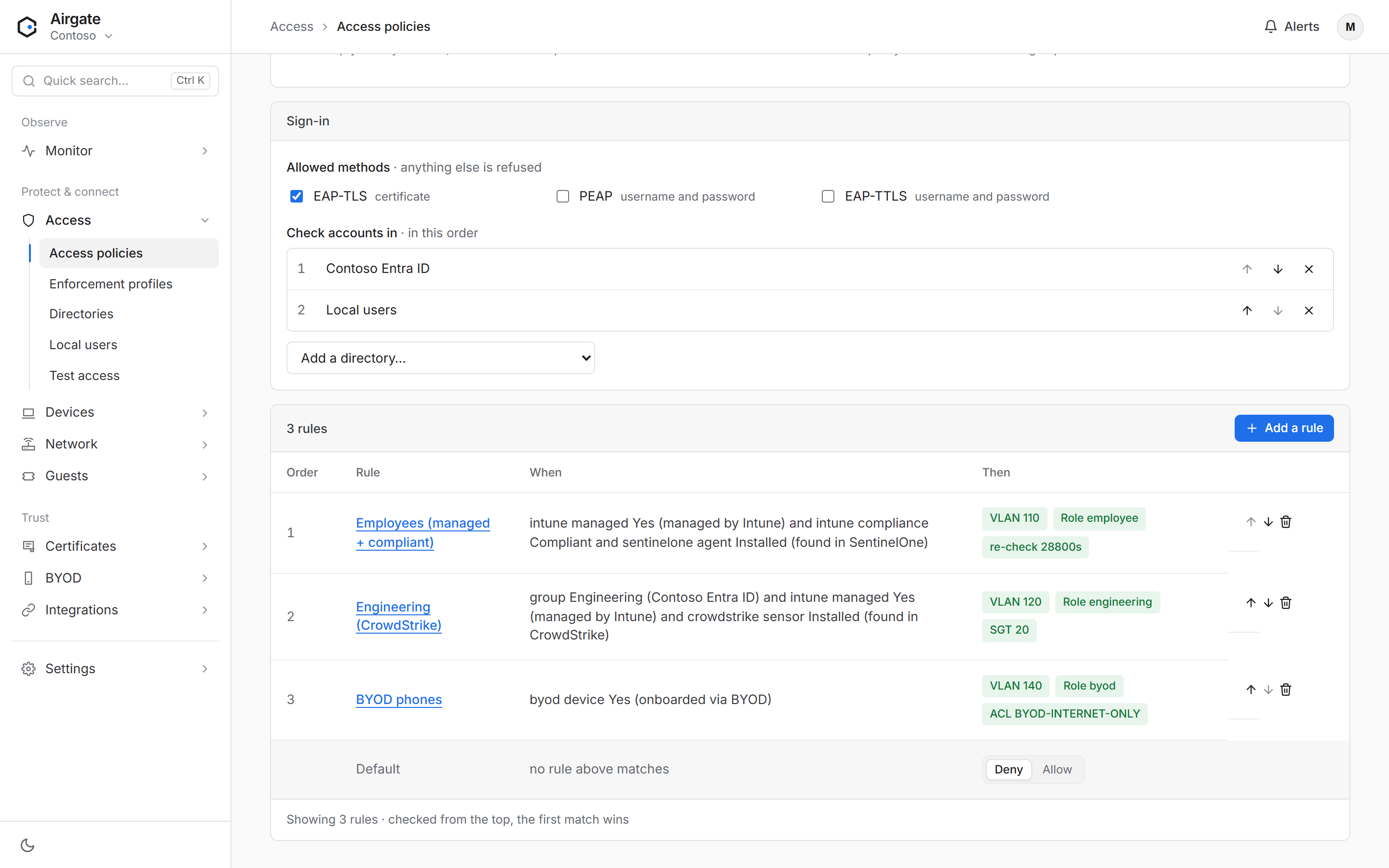
One service for employees, devices, guests and administrators.
802.1X and MAC authentication
EAP-TLS, PEAP-MSCHAPv2 and EAP-TTLS on wired and wireless; MAC authentication for printers, cameras and IoT; PAP for VPNs. RADIUS and RadSec.
Authentication methodsDevice compliance
Intune, Jamf, SentinelOne and CrowdStrike facts in every decision. Devices are matched by their Intune device ID, so private Wi-Fi addresses don't break it.
Build a compliance policyCertificates
A built-in certificate authority with SCEP validated by Intune, OCSP and CRL. Profiles for Windows, macOS, iOS and Android are in the guides.
Intune SCEP with AirgateGuest Wi-Fi
Guest portals in your branding, Wi-Fi passes with QR codes at reception, and guest passwords delivered in Microsoft Teams to the employee the visitor came to see.
Guest accessPersonal devices
Employees put their own phones and laptops on the secure network themselves: sign in with Entra ID, then the AirEnroll app or a profile installs a certificate for that one device.
BYOD onboardingDevice visibility
Every endpoint with its type, from DHCP and User-Agent fingerprints, MAC lists for known devices, and live sessions with disconnect and re-authorise.
Device profilingSwitch and router logins
TACACS+ for network engineers with their own directory accounts, privilege levels and a full log of who logged in where.
TACACS+For enterprises and service providers
Isolated tenants, administrator roles, single sign-on for the console, a REST API, webhooks and SIEM export.
Tenants and rolesWorks with what you already run.
Identity providers, device management, endpoint security, firewalls, ITSM and SIEM, and switches and access points from any vendor that speaks RADIUS.
| Integration | In Airgate | Status |
|---|---|---|
| Microsoft Entra ID | Users, groups and attributes for access rules; console single sign-on. | Available |
| Active Directory | LDAPS groups and attributes; PEAP-MSCHAPv2 through a domain-joined appliance or site connector. | Available |
| Okta | Users and groups; password sign-in for PAP and TTLS. | Available |
| Google Workspace | Users and Google Groups through Secure LDAP. | Available |
| LDAP, SQL, REST, RADIUS, token servers | Any other directory Airgate can query or proxy to. | Available |
| Microsoft Intune | Managed and compliance state in rules; SCEP certificates validated by Intune; devices matched by Intune device ID. | Available |
| Jamf Pro | Device sync for Macs, iPhones and iPads; "Managed by an MDM" and "MDM compliance" in rules. A dedicated console page is planned. | Available |
| SentinelOne | Agent presence and active threats in rules; virtual interfaces filtered out. | Available |
| CrowdStrike Falcon | Sensor presence and network containment in rules; Zero Trust Assessment scores. | Available |
| Palo Alto Networks (NGFW, Panorama) | User-ID mappings pushed on sign-in and removed on sign-out. | Available |
| Fortinet (FortiGate, FortiAuthenticator) | SSO login and logout pushed through HTTP actions. | Available |
| Check Point | Identity Awareness add-identity and delete-identity through HTTP actions. | Available |
| ServiceNow | Open or update records from Airgate events through HTTP actions. | Available |
| Splunk | Events to Splunk HTTP Event Collector. | Available |
Airgate Cloud
Airowire runs the service: updates, backups and capacity are ours to manage. You add switches, directories and rules.
Site connector
A small service at each site carries RADIUS to the cloud over RadSec, relays disconnects through NAT and reaches on-prem Active Directory. Outbound connections only.
VMware appliance
The whole platform as an OVA on ESXi, updated from the console. Hyper-V, Azure and AWS images are on the roadmap.